Valid for the current range of GIGAMEDIA IP recorders *
The Favorite Camera Management feature allows you, when multiple recorders are configured in your app, to select a specific set of cameras and display them in a single custom layout.
In the GGM VIEW app, find the 3 dots at the top right then Favorites: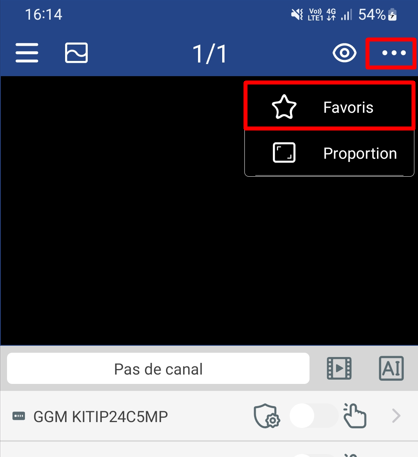
You will have the option to create a new group or edit a group with the pencil and then select the camera(s) in Favorites:
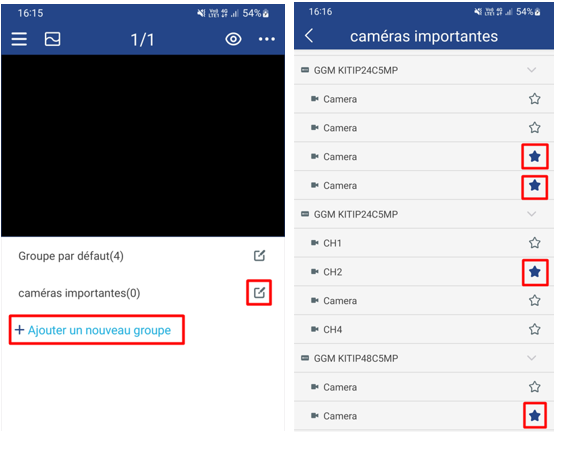
You will be able to check the little star to select the cameras in Favorites
You also have the option to configure this layout to be displayed automatically when the GGM VIEW app starts:
GGM VIEW - I would like to automatically display one or more cameras when launching the application
----------------------------------------------------
* Depending on the model and firmware version used :
GGM KITIP24C5MP
GGM KITIP24CD5MP
GGM KITIP48C5MP
GGM KITIP48CD5MP
GGM KITIP48C4MPA
GGM KITIP48CD4MPA
GGM KITIP48CDM5MP
GGM KITIP816C5MP
GGM KITIP816CDM5MP
GGM NVRL0104
GGM NVRL0104P
GGM NVRL0108P
GGM NVR0108PA
GGM NVR0208P
GGM NVR020808P
GGM NVR0216P
GGM NVR021608P
GGM NVR021616P
GGM NVR0232
GGM NVR023216P
GGM NVR0416
GGM NVR0432
GGM NVR043216P
GGM NVR0816
GGM NVR081616P
GGM NVR083216P
GGM NVR0832
GGM NVR16
GGM NVR32
GGM NVRE0104P
GGM NVRE0108P
Was this article helpful?
That’s Great!
Thank you for your feedback
Sorry! We couldn't be helpful
Thank you for your feedback
Feedback sent
We appreciate your effort and will try to fix the article